고정 헤더 영역
상세 컨텐츠
본문

protocol & delegate


프로토콜은 자바에서 인터페이스와 비슷하다.
프로토콜은 다중 상속이 가능하다.
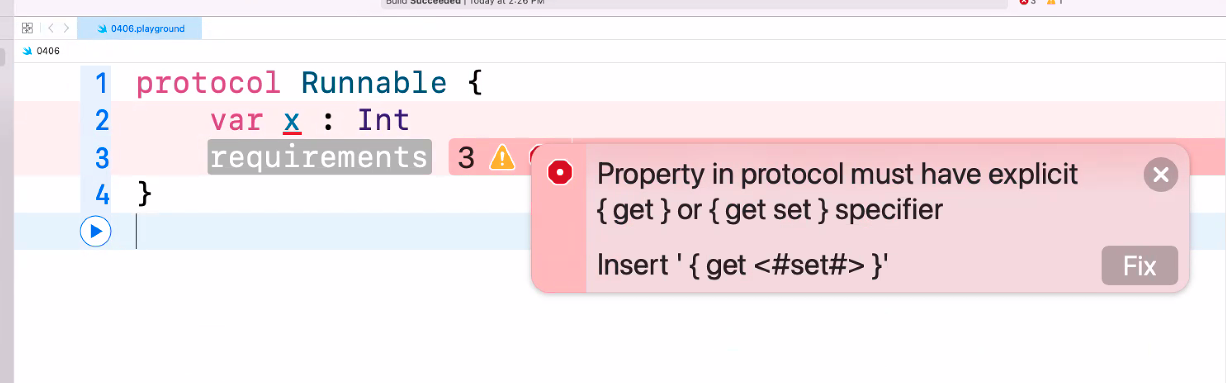
프로토콜을 만들 때는 변수에는 값을 넣으면 안되고,
{get} 또는 {get set} 을 넣어야 한다.
get은 읽기 권한, set은 수정 권한이라고 보면 된다.
protocol Runnable {
    var x : Int { get set }
}
프로토콜 상속 오류
채택을 완료함 상속과는 다름 !!
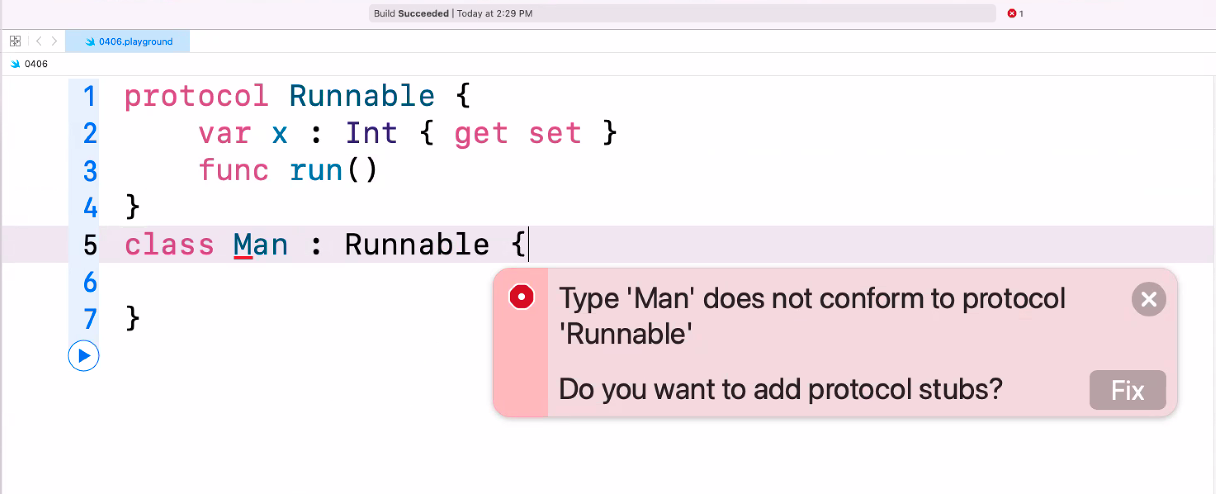
protocol Runnable {
    var x: Int { get set }
    func run()

}
class Man : Runnable {
    var x : Int = 1
    func run() {
        print("이쿠요잇~~~!!")
    }
}
1️⃣ protocol Runnable
protocol Runnable {
    var x : Int { get set }
    func run()
}
👉 프로토콜 = 규칙(설계도) 라고 보면 된다.
- Runnable이라는 프로토콜은 다음을 반드시 구현해야 한다고 요구한다:
- x라는 정수형 변수 (읽기/쓰기 가능)
- run()이라는 함수
즉,
“Runnable을 따르는 타입은 무조건 x랑 run()을 가져야 해!” 라는 약속이다.
2️⃣ class Man : Runnable
class Man : Runnable {
    var x: Int = 1
    func run() { print("달려~~~") }
}
👉 Man 클래스는 Runnable 프로토콜을 채택(implements) 했다.
그래서:
- x 변수도 만들고
- run() 함수도 구현해야 한다
지금 코드에서는:
- x = 1로 초기값 설정
- run() 실행하면 "달려~~~" 출력
3️⃣ 전체 의미 정리
“달릴 수 있는(Runnable) 존재는 x라는 값과 run() 행동을 가져야 해.”
그리고 Man은:
“나는 Runnable 규칙을 따르는 사람이니까, 실제로 달리는 기능을 구현할게!”
4️⃣ 실제 사용 예 (이렇게 쓸 수 있음)
let m = Man()
m.run()   // 출력: 달려~~~
print(m.x) // 출력: 1
핵심 포인트 💡
- protocol → “이런 기능 꼭 만들어!”
- class : protocol → “그 규칙을 따르겠다”
- 구현 → 실제 동작 작성
프로토콜은 상속이 아니라 채택하는 것이다.
실습

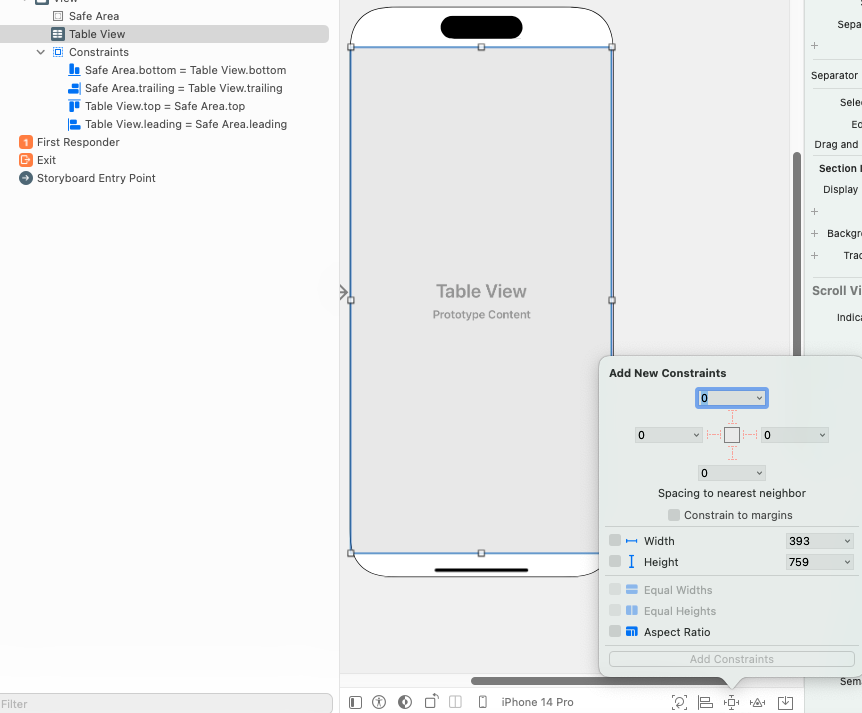
화면 비율에 딱 맞게 설정하기
constrain to margins 를 체크하지 않으면 완전 딱붙여서 설정 가능
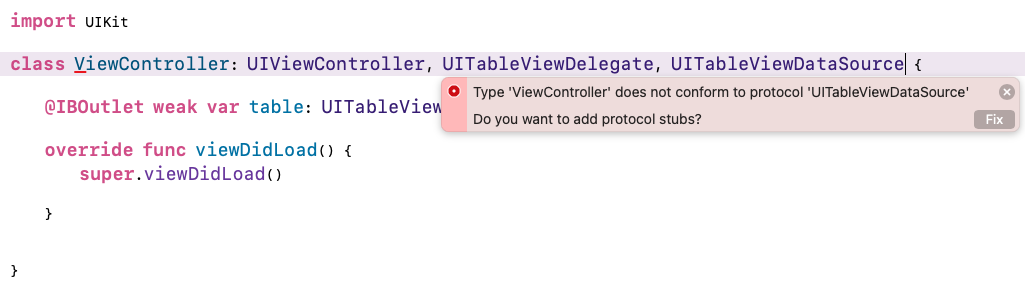
conform 오류
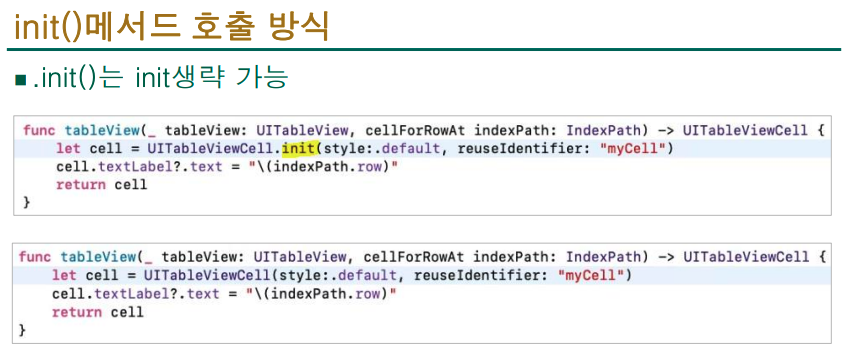
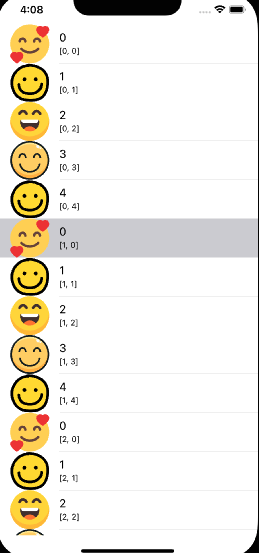
import UIKit

var image = ["smile.png", "smile3.png","smile2.png","smile1.png","happy.png"]
class ViewController: UIViewController, UITableViewDelegate, UITableViewDataSource {
    @IBOutlet weak var table: UITableView!

    func tableView(_ tableView: UITableView, numberOfRowsInSection section: Int) -> Int {
        return 5
    }

    func tableView(_ tableView: UITableView, cellForRowAt indexPath: IndexPath) -> UITableViewCell {
        let cell = UITableViewCell(style: .subtitle, reuseIdentifier: "myCell")
        cell.textLabel?.text = "\(indexPath.row)"
        cell.detailTextLabel?.text = indexPath.description
        cell.imageView?.image = UIImage(named:
                                            image[indexPath.row])
        return cell
    }

    func numberOfSections(in tableView: UITableView) -> Int {
        return 3
    }

    override func viewDidLoad() {
        super.viewDidLoad()
        table.delegate = self
        table.dataSource = self
    }

}





//
//  ViewController.swift
//  Food
//
//  Created by 소프트웨어컴퓨터 on 2026/04/06.
//

import UIKit

var food = ["케이크","사탕","물약","피자","칵테일"]
var name = ["베이킹 덕","찰리의 초콜릿 공장","마녀의 오두막","프레디의 피자가게","야르한 칵테일"]
var image = ["cake.png", "candy.png", "flask.png", "pizza.png", "cocktail.png"]

class ViewController: UIViewController,UITableViewDelegate,UITableViewDataSource {
    func tableView(_ tableView: UITableView, numberOfRowsInSection section: Int) -> Int {
        return 5
    }

    func tableView(_ tableView: UITableView, cellForRowAt indexPath: IndexPath) -> UITableViewCell {
        let cell = UITableViewCell(style: .subtitle, reuseIdentifier: "myCell")
        cell.textLabel?.text = name[indexPath.row]
        cell.detailTextLabel?.text = food[indexPath.row]
        cell.imageView?.image = UIImage(named: image[indexPath.row])
        return cell
    }

    func numberOfSections(in tableView: UITableView) -> Int {
        return 3
    }

    @IBOutlet weak var table: UITableView!

    override func viewDidLoad() {
        super.viewDidLoad()
        table.delegate = self
        table.dataSource = self

    }


}

배열을 이용해서 식당 이름과 대표 메뉴를 출력

//
//  ViewController.swift
//  Food
//
//  Created by 소프트웨어컴퓨터 on 2026/04/06.
//

import UIKit

var food = ["케이크","사탕","물약","피자","칵테일"]
var name = ["베이킹 덕","찰리의 초콜릿 공장","마녀의 오두막","프레디의 피자가게","야르한 칵테일"]
var image = ["cake.png", "candy.png", "flask.png", "pizza.png", "cocktail.png"]

class ViewController: UIViewController,UITableViewDelegate,UITableViewDataSource {
    func tableView(_ tableView: UITableView, numberOfRowsInSection section: Int) -> Int {
        return 5
    }

    func tableView(_ tableView: UITableView, cellForRowAt indexPath: IndexPath) -> UITableViewCell {
//        let cell = UITableViewCell(style: .subtitle, reuseIdentifier: "myCell")
//        cell.textLabel?.text = name[indexPath.row]
//        cell.detailTextLabel?.text = food[indexPath.row]
//        cell.imageView?.image = UIImage(named: image[indexPath.row])
        let cell = tableView.dequeueReusableCell(withIdentifier: "myCell", for: indexPath) as! MyTableViewCell
        cell.myLable.text = name[indexPath.row]
            return cell
    }

    func numberOfSections(in tableView: UITableView) -> Int {
        return 5
    }

    @IBOutlet weak var table: UITableView!

    override func viewDidLoad() {
        super.viewDidLoad()
        table.delegate = self
        table.dataSource = self

    }


}
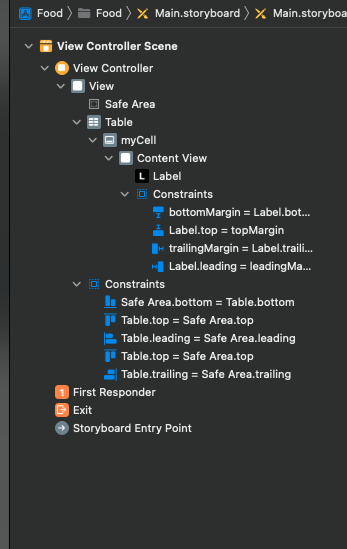
pin 툴을 이용해서 constraints를 설정
여러 개의 constraints를 만들 수 있다.
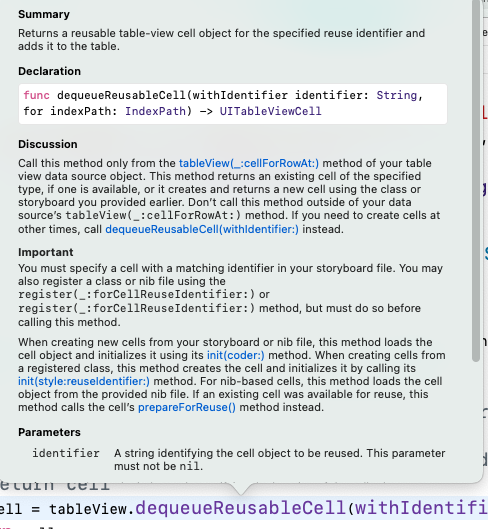
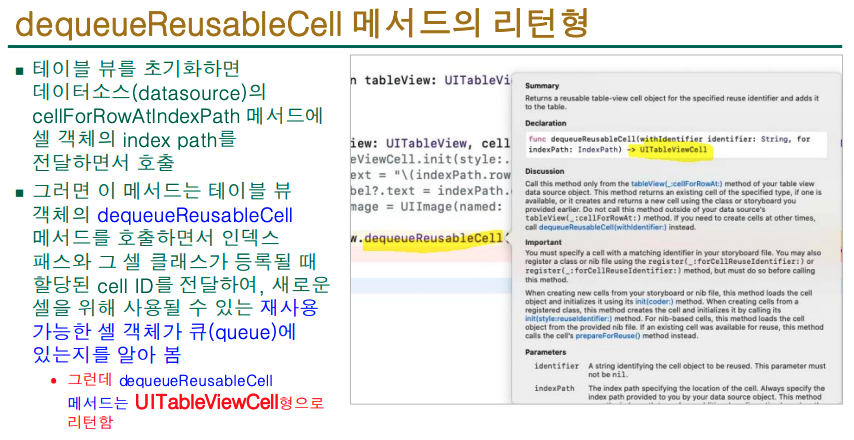
return형 확인
return형 적는 문제 출제
'2026년도 1학기 > iOS프로그래밍' 카테고리의 다른 글
| iOS프로그래밍_7주차_열거형(enum), 구조체(struct)클래스vs.구조체vs. 열거형 (2) | 2026.04.20 |
|---|---|
| iOS 프로그래밍실무_6주차_옵셔널 체이닝(Optional Chaining) (0) | 2026.04.13 |
| iOS프로그래밍_4주차_클래스(class) 상속 (0) | 2026.03.30 |
| iOS프로그래밍_3주차_무드등 iOS앱을 만들며Xcode와 Swift 친숙해지기 (0) | 2026.03.23 |
| iOS프로그래밍_2주차_데이터 타입(자료형)상수(let), 변수(var) (0) | 2026.03.16 |


