고정 헤더 영역

상세 컨텐츠
본문
오토레이아웃을 구현하는 방법의 장단점
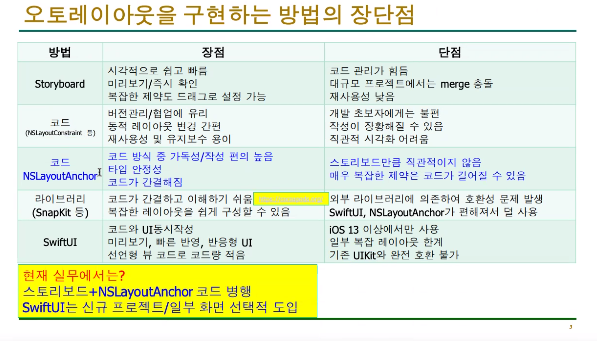
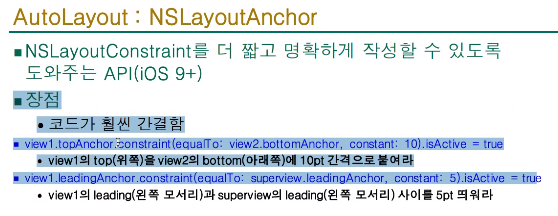
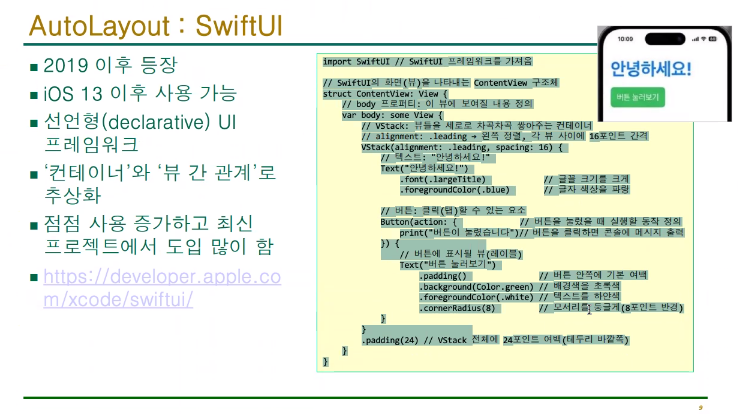
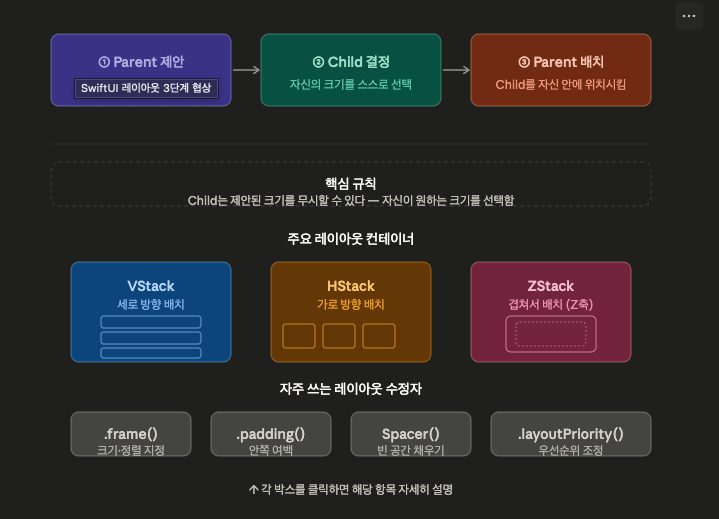
https://github.com/SnapKit/SnapKit?utm_source=chatgpt.com
GitHub - SnapKit/SnapKit: A Swift Autolayout DSL for iOS & OS X
A Swift Autolayout DSL for iOS & OS X. Contribute to SnapKit/SnapKit development by creating an account on GitHub.
github.com

애플 개발자들이많이 사용하는 라이브러리
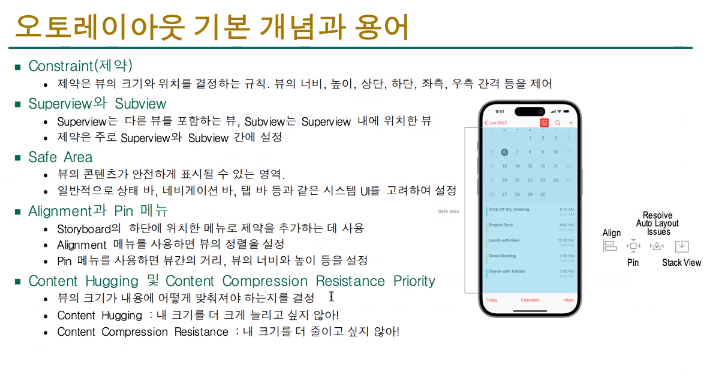


스택뷰
사이드 인스펙터


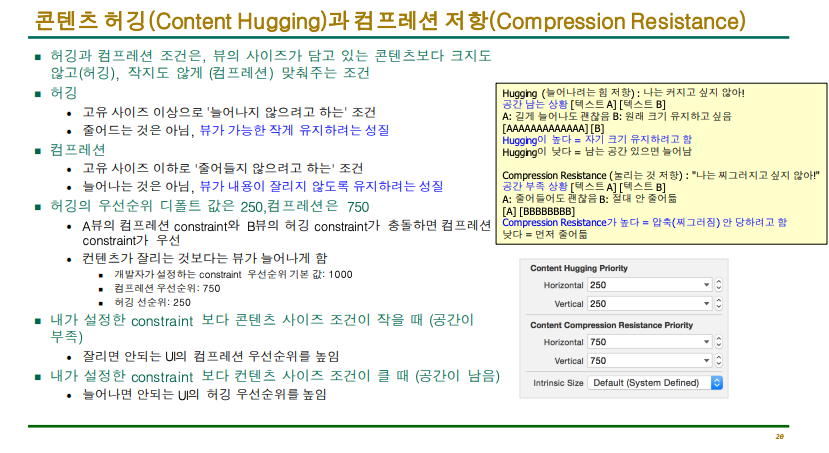
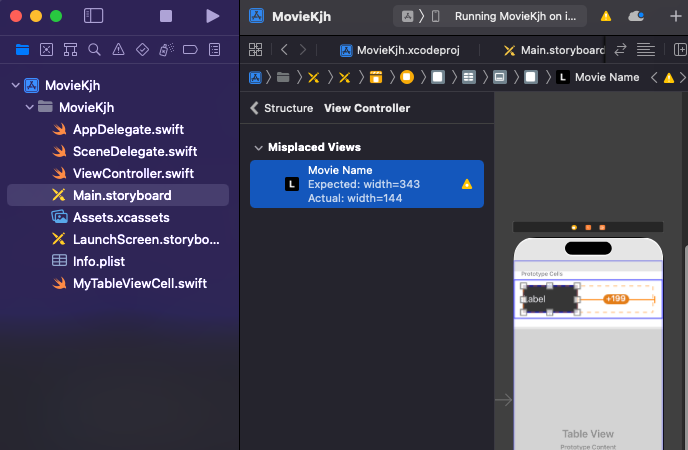
수동으로 조절하면 이런씩으로 경고 창이 뜸
(수치로 조정했는데 이게 맞나 헤매고 있는 거임)
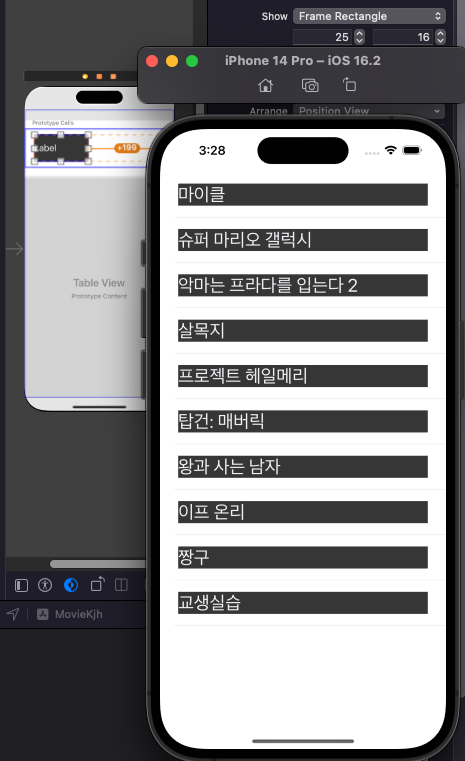
했지만 보이는 건다름.
(우선순위 때문에 이전에 했던것이 적용 됨)
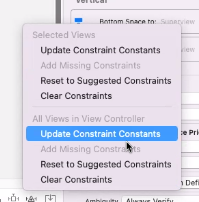
이걸 누르면 자동으로 엑스코드에서 해결 해 줌.

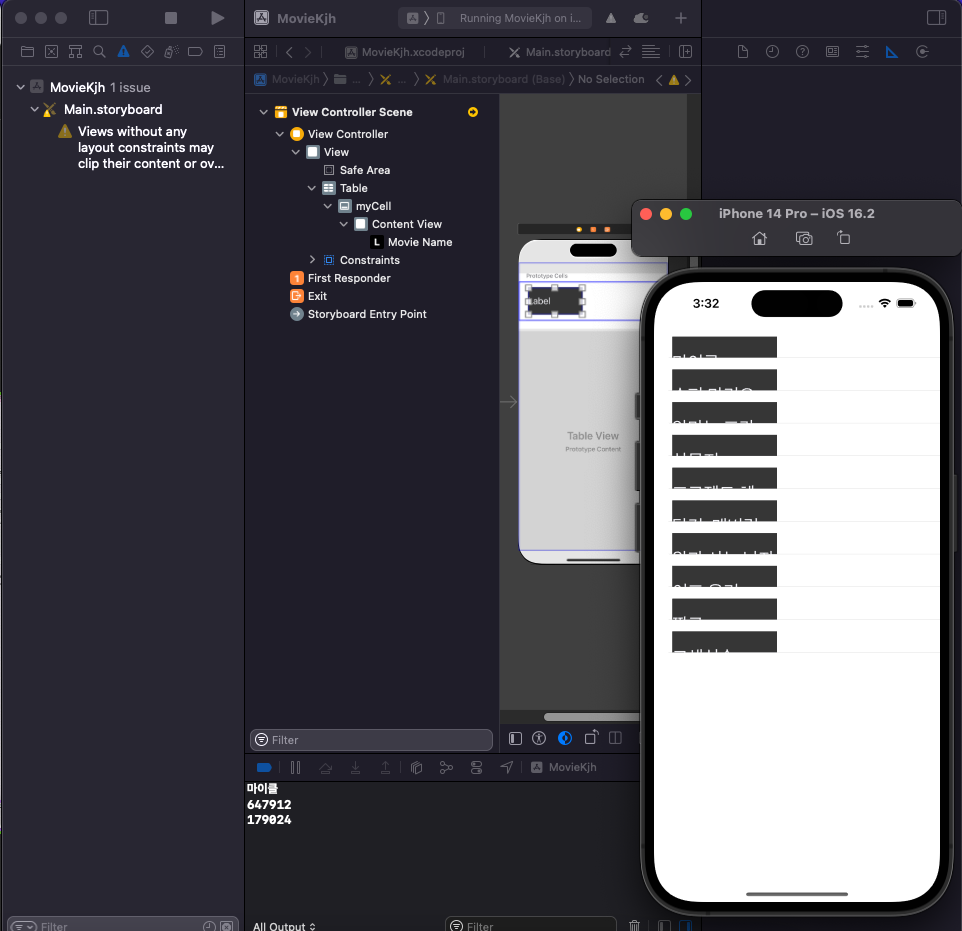
레이블을 지우면 보이던 모양으로 됨
이걸 해결을 위해 스택뷰로 만들기
레이어 만들고
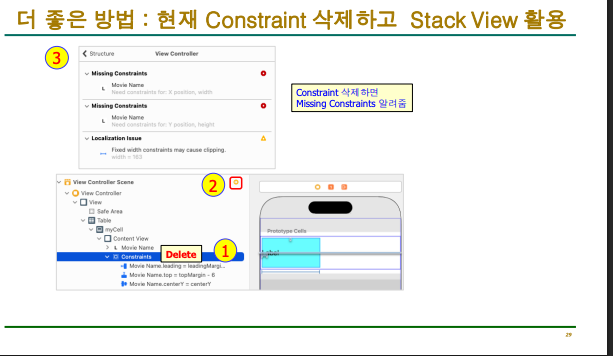


왼쪽에 있는 타이틀 부분을 H스택뷰(수평)
안쪽에 있는 부분은 W스택뷰(수직)
소스
//
//  ViewController.swift
//  MovieKjh
//
//  Created by Induk-cs  on 2026/05/04.
//

import UIKit

struct MovieData : Codable {
    let boxOfficeResult : BoxOfficeResult
}
struct BoxOfficeResult : Codable {
    let dailyBoxOfficeList : [DailyBoxOfficeList]
}
struct DailyBoxOfficeList : Codable {
    let movieNm : String
    let audiCnt : String
    let audiAcc : String
    let rank : String
}

class ViewController: UIViewController, UITableViewDelegate, UITableViewDataSource {

    @IBOutlet weak var table: UITableView!
    var movieData : MovieData?

    var movieURL = "https://kobis.or.kr/kobisopenapi/webservice/rest/boxoffice/searchDailyBoxOfficeList.json?key=36209978a1ca825ed365969b126bfc15&targetDt="

    func tableView(_ tableView: UITableView, numberOfRowsInSection section: Int) -> Int {
        return 10
    }

    func tableView(_ tableView: UITableView, cellForRowAt indexPath: IndexPath) -> UITableViewCell {
        let cell = tableView.dequeueReusableCell(withIdentifier: "myCell", for: indexPath) as! MyTableViewCell
//        cell.movieName.text = movieData?.boxOfficeResult.dailyBoxOfficeList[indexPath.row].movieNm

        if let mRank = movieData?.boxOfficeResult.dailyBoxOfficeList[indexPath.row].rank,
           let mName = movieData?.boxOfficeResult.dailyBoxOfficeList[indexPath.row].movieNm {
            let emoji: String
            switch mRank {
            case "1": emoji = "🥇"
            case "2": emoji = "🥈"
            case "3": emoji = "🥉"
            default:  emoji = "•"
            }
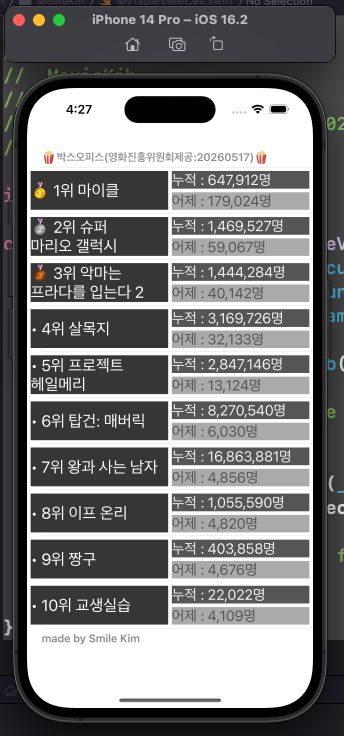
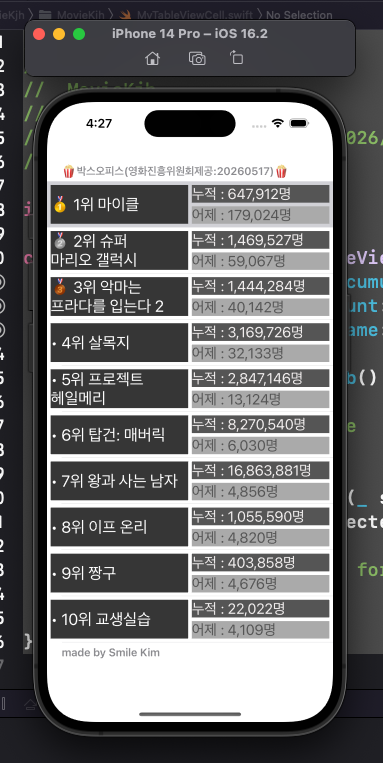
            cell.movieName.text = "\(emoji) \(mRank)위 \(mName)"

        }

        if let aAcc = movieData?.boxOfficeResult.dailyBoxOfficeList[indexPath.row].audiAcc {
            let numF = NumberFormatter()
            numF.numberStyle = .decimal
            let result = numF.string(for: Int(aAcc))!
            cell.audiAccumulate.text = "누적 : \(result)명"
        }

        if let aCnt = movieData?.boxOfficeResult.dailyBoxOfficeList[indexPath.row].audiCnt {
            let numF = NumberFormatter()
            numF.numberStyle = .decimal
            let result = numF.string(for: Int(aCnt))!
            cell.audiCount.text = "어제 : \(result)명"
        }


//        cell.audiAccumulate.text = movieData?.boxOfficeResult.dailyBoxOfficeList[indexPath.row].audiAcc
//        cell.audiCount.text = movieData?.boxOfficeResult.dailyBoxOfficeList[indexPath.row].audiCnt


        //        print(indexPath.description)
        return cell
    }


    func tableView(_ tableView: UITableView, titleForHeaderInSection section: Int) -> String? {
        return "🍿박스오피스(영화진흥위원회제공:"+makeYesterdayString()+")🍿"
    }

    func tableView(_ tableView: UITableView, titleForFooterInSection section: Int) -> String? {
        return "made by Smile Kim"
    }

    func numberOfSections(in tableView: UITableView) -> Int {
        return 1
    }


    override func viewDidLoad() {
        super.viewDidLoad()
        table.delegate = self
        table.dataSource = self
        movieURL += makeYesterdayString()
        getData()
    }

    func makeYesterdayString() -> String {
        let y = Calendar.current.date(byAdding:.day, value : -1, to : Date())!
        let dateF = DateFormatter()
        dateF.dateFormat = "yyyyMMdd"
        let day = dateF.string(from: y)
        return day
    }

    func getData(){
        guard let url = URL(string: movieURL) else { return }// 네트워크 1단계:주소 만들기
        let session = URLSession(configuration: .default)// 네트워크 2단계:택배회사 정하기
        let task = session.dataTask(with: url) { data, response, error in
            if error != nil {
                print(error!)
                return
            }
            guard let JSONData = data else { return }
            //        print(JSONData)
            _ = String(data:JSONData, encoding: .utf8)
            //        print(dataString!)

            let decoder = JSONDecoder()
            do{
                let decodedData = try decoder.decode(MovieData.self, from: JSONData)
                print(decodedData.boxOfficeResult.dailyBoxOfficeList[0].movieNm)
                print(decodedData.boxOfficeResult.dailyBoxOfficeList[0].audiAcc)
                print(decodedData.boxOfficeResult.dailyBoxOfficeList[0].audiCnt)
                self.movieData = decodedData
                DispatchQueue.main.async {
                    self.table.reloadData()
                }
            }catch{
                print(error)
            }
        }

        task.resume()
    }


}
//
//  MyTableViewCell.swift
//  MovieKjh
//
//  Created by Induk-cs  on 2026/05/04.
//

import UIKit

class MyTableViewCell: UITableViewCell {
    @IBOutlet weak var audiAccumulate: UILabel!
    @IBOutlet weak var audiCount: UILabel!
    @IBOutlet weak var movieName: UILabel!

    override func awakeFromNib() {
        super.awakeFromNib()
        // Initialization code
    }

    override func setSelected(_ selected: Bool, animated: Bool) {
        super.setSelected(selected, animated: animated)

        // Configure the view for the selected state
    }

}
'2026년도 1학기 > iOS프로그래밍' 카테고리의 다른 글
| iOS 프로그래밍실무_12주차_Open API 기반iOS앱 개발(5) (0) | 2026.06.01 |
|---|---|
| iOS 프로그래밍실무_10주차_Open API 기반iOS앱 개발(3) (0) | 2026.05.11 |
| iOS 프로그래밍실무_10주차_Open API 기반iOS앱 개발(3) (0) | 2026.05.11 |
| iOS프로그래밍_9주차_Open API 기반iOS앱 개발(1)RESTful/JSON/Open API (0) | 2026.05.04 |
| 중간고사 (semi-openbook) 안내 (0) | 2026.04.20 |


