고정 헤더 영역

상세 컨텐츠
본문
1. Navigation Controller 방식
가장 일반적인 화면 전환 방식이다.
예시:
- 목록 → 상세 화면
- 홈 → 설정 화면
- 게시글 → 게시글 내용
다음 화면으로 이동
let vc = SecondViewController()
navigationController?.pushViewController(vc, animated: true)
이전 화면으로 돌아가기
navigationController?.popViewController(animated: true)
구조
NavigationController
 └─ FirstViewController
      └─ SecondViewController
특징
- 화면이 스택(Stack) 구조로 관리된다.
- 뒤로가기 버튼이 자동 생성된다.
- 실무에서 가장 많이 사용된다.
2. Present 방식 (모달)
현재 화면 위에 새로운 화면을 띄우는 방식이다.
예시:
- 로그인 화면
- 팝업
- 작성 화면
화면 띄우기
let vc = SecondViewController()
present(vc, animated: true)
화면 닫기
dismiss(animated: true)
특징
- 독립적인 화면 느낌이다.
- 아래에서 위로 올라오는 애니메이션이 기본이다.
- 닫기 버튼을 직접 구현하는 경우가 많다.
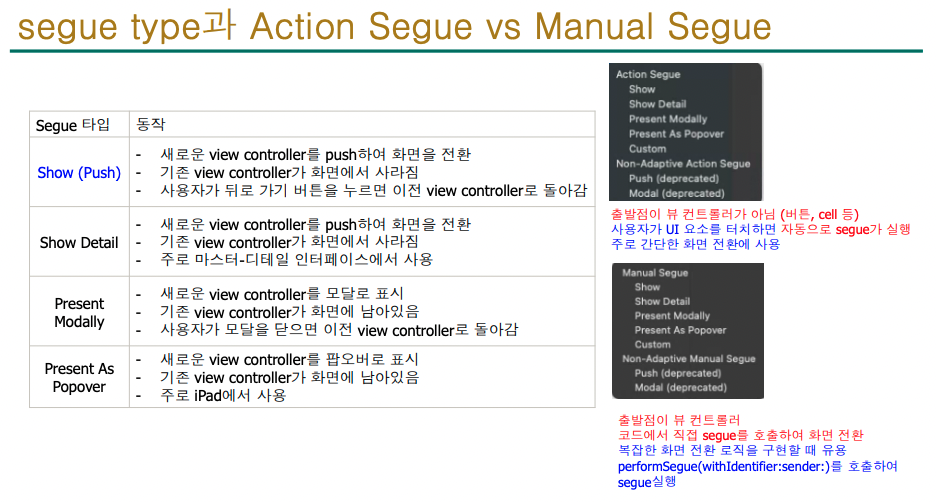
3. Storyboard Segue 방식
스토리보드에서 화면끼리 직접 연결하는 방식이다.
사용 방법
- ViewController 추가
- 버튼에서 Control + Drag
- 다음 ViewController에 연결
- Show 또는 Present Modally 선택
코드로 실행
performSegue(withIdentifier: "goNext", sender: nil)
데이터 전달
override func prepare(for segue: UIStoryboardSegue, sender: Any?) {

    let nextVC = segue.destination as! SecondViewController
    nextVC.name = "홍길동"
}
특징
- 초보자가 배우기 쉽다.
- 시각적으로 연결 가능하다.
- 규모가 커지면 관리가 어려워질 수 있다.
4. Tab Bar 방식
하단 탭을 눌러 화면을 전환하는 방식이다.
예시:
- 인스타그램
- 유튜브
- 카카오톡
구조
TabBarController
 ├─ HomeVC
 ├─ SearchVC
 └─ ProfileVC
특징
- 앱의 큰 메뉴 이동에 사용된다.
- 탭을 누르면 즉시 화면이 전환된다.
실무에서 자주 사용하는 구조
보통 아래처럼 조합해서 사용한다.
TabBarController
 ├─ NavigationController
 │    └─ HomeVC
 │         └─ DetailVC
 └─ NavigationController
      └─ SettingVC
즉:
- 큰 메뉴 이동 → TabBar
- 세부 화면 이동 → NavigationController
형태로 많이 구성한다.
버튼 클릭 시 화면 이동 예제
@IBAction func nextButton(_ sender: UIButton) {

    let vc = SecondViewController()

    navigationController?.pushViewController(vc, animated: true)
}
Storyboard에서 ViewController 가져오기
let storyboard = UIStoryboard(name: "Main", bundle: nil)

let vc = storyboard.instantiateViewController(
    withIdentifier: "SecondViewController"
)

navigationController?.pushViewController(vc, animated: true)
※ Storyboard ID 설정이 필요하다.
정리
방식특징사용 예시
| Push | 스택 구조 | 상세 페이지 |
| Present | 모달 표시 | 로그인, 팝업 |
| Segue | 스토리보드 연결 | 간단한 앱 |
| TabBar | 큰 메뉴 이동 | SNS 앱 |


타입 : UIViewController

바뀐 타입 : DetailViewController
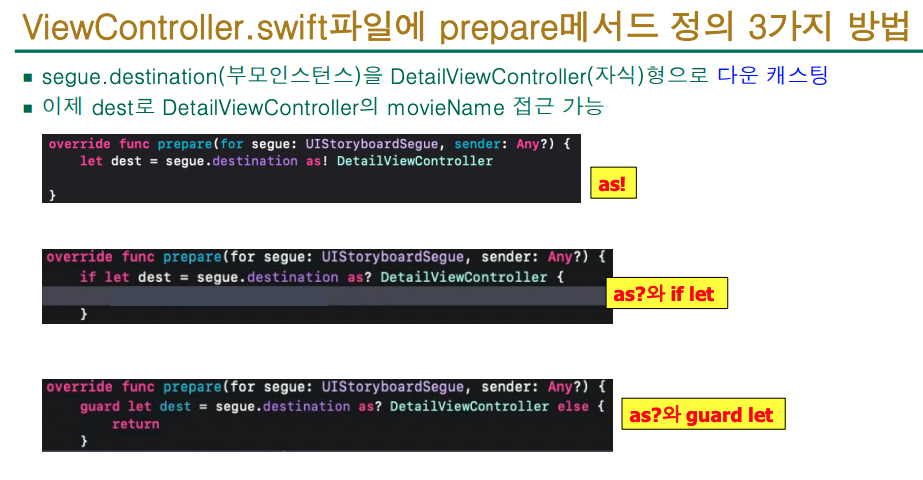
3가지 방법
override func prepare(for segue: UIStoryboardSegue, sender: Any?) {
        let dest = segue.destination as! DetailViewController
        let myIndexPath = table.indexPathForSelectedRow!
        let row = myIndexPath.row
        print(row)
    }
이 코드는 Segue 로 화면 전환이 일어나기 직전에 실행되는 메서드다.
주로 다음 화면에 데이터를 전달할 때 사용한다.
코드 전체를 보면:
override func prepare(for segue: UIStoryboardSegue, sender: Any?) {

    let dest = segue.destination as! DetailViewController

    let myIndexPath = table.indexPathForSelectedRow!

    let row = myIndexPath.row

    print(row)
}
전체 흐름
현재 화면에 UITableView 가 있고,
사용자가 셀을 터치하면:
현재 화면 → DetailViewController
로 이동한다고 가정한 코드다.
한 줄씩 설명
1.
override func prepare(for segue: UIStoryboardSegue, sender: Any?)
Segue가 실행되기 직전에 자동 호출되는 메서드다.
즉:
화면 전환 직전
에 실행된다.
2.
let dest = segue.destination as! DetailViewController
이동할 다음 화면(ViewController)을 가져오는 코드다.
즉:
도착할 화면 = DetailViewController
라는 의미다.
3.
let myIndexPath = table.indexPathForSelectedRow!
현재 선택된 테이블 셀의 위치(IndexPath)를 가져온다.
예를 들어:
3번째 셀 클릭
이면:
IndexPath(row: 2, section: 0)
같은 값이 저장된다.
4.
let row = myIndexPath.row
선택된 행 번호만 가져온다.
예:
2
5.
print(row)
선택된 행 번호를 출력한다.
예:
2
출력됨.
실제 목적
보통은 선택한 행 번호를 이용해서
다음 화면에 데이터를 전달한다.
예:
override func prepare(for segue: UIStoryboardSegue, sender: Any?) {

    let dest = segue.destination as! DetailViewController

    let myIndexPath = table.indexPathForSelectedRow!

    let row = myIndexPath.row

    dest.movieName = movieList[row]
}
흐름 정리
테이블 셀 클릭
    ↓
prepare 실행
    ↓
몇 번째 셀인지 확인
    ↓
다음 화면에 데이터 전달
    ↓
화면 전환
핵심
이 코드의 핵심 목적은:
사용자가 선택한 셀 정보를
다음 화면으로 전달하기 위함
이다.
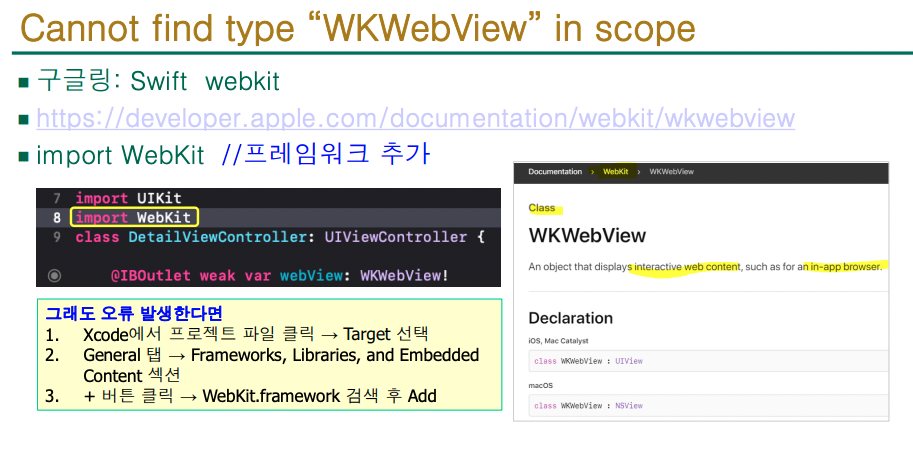
오류 해결 방법


'2026년도 1학기 > iOS프로그래밍' 카테고리의 다른 글
| iOS 프로그래밍실무_11주차_Open API 기반iOS앱 개발(4) (0) | 2026.05.18 |
|---|---|
| iOS 프로그래밍실무_10주차_Open API 기반iOS앱 개발(3) (0) | 2026.05.11 |
| iOS 프로그래밍실무_10주차_Open API 기반iOS앱 개발(3) (0) | 2026.05.11 |
| iOS프로그래밍_9주차_Open API 기반iOS앱 개발(1)RESTful/JSON/Open API (0) | 2026.05.04 |
| 중간고사 (semi-openbook) 안내 (0) | 2026.04.20 |


